
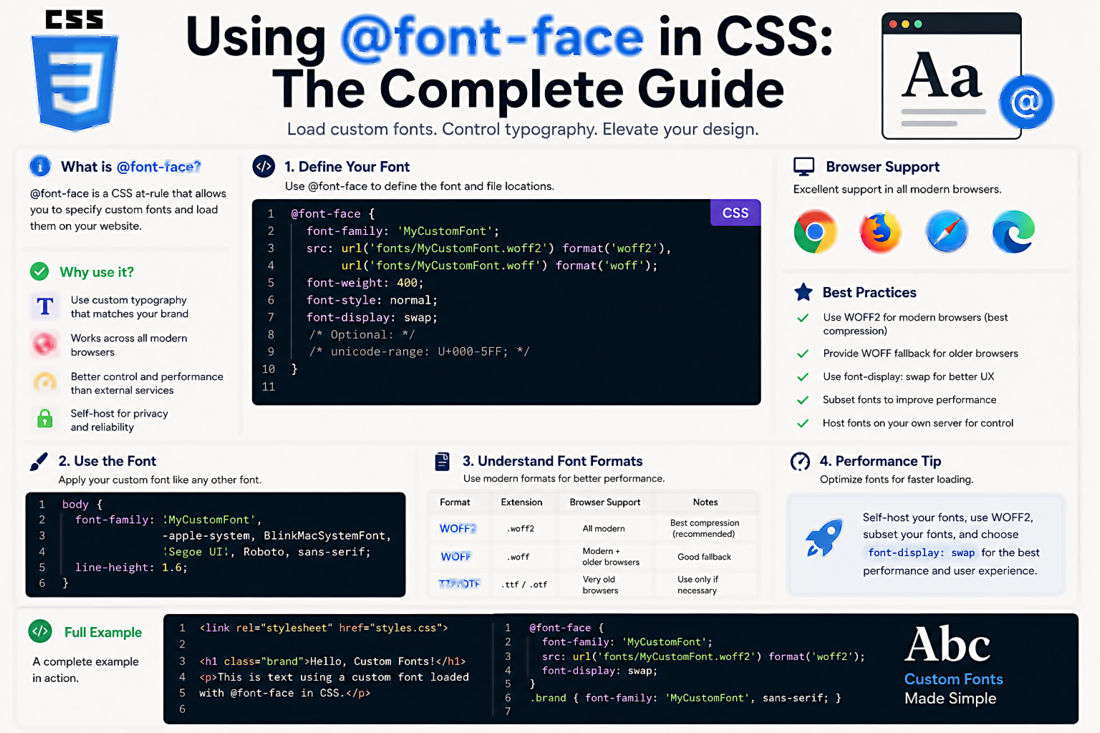
Using @font-face in CSS: The Complete Guide
The @font-face CSS rule lets you load custom fonts directly from your server rather than relying on Google Fonts, Adobe Fonts, or system fonts. Done correctly, it's faster, more private, and gives you complete control.
The Basic Syntax
@font-face {
  font-family: 'MyFont';
  src: url('/fonts/myfont.woff2') format('woff2'),
       url('/fonts/myfont.woff') format('woff');
  font-weight: normal;
  font-style: normal;
  font-display: swap;
}
Then use it like any other font:
body {
  font-family: 'MyFont', sans-serif;
}
Which Formats Do You Need?
In 2025, you only need WOFF2. Browser support is at 98%+ globally. WOFF (without the 2) is worth including as a fallback for very old browsers if your analytics show them. TTF, EOT, and SVG formats are legacy formats you can safely ignore for new projects.
font-display: Explained
The font-display descriptor controls what happens while the font is loading:
- swap — Show fallback font immediately, swap to custom font when loaded. Good for body text — no invisible content, but expect a flash of unstyled text (FOUT)
- block — Show invisible text for a short period, then display. Prevents FOUT but can cause blank content flash
- fallback — Short block period, then uses fallback if font isn't ready quickly
- optional — Browser decides based on connection speed; on slow connections may never load the custom font
Best practice: Use swap for body text, block for icon fonts (where the fallback character would be meaningless).
Handling Multiple Weights and Styles
Each font weight and style needs its own @font-face declaration:
@font-face {
  font-family: 'MyFont';
  src: url('/fonts/myfont-regular.woff2') format('woff2');
  font-weight: 400;
  font-style: normal;
  font-display: swap;
}

@font-face {
  font-family: 'MyFont';
  src: url('/fonts/myfont-bold.woff2') format('woff2');
  font-weight: 700;
  font-style: normal;
  font-display: swap;
}

@font-face {
  font-family: 'MyFont';
  src: url('/fonts/myfont-italic.woff2') format('woff2');
  font-weight: 400;
  font-style: italic;
  font-display: swap;
}
Use the same font-family name for all of them — the browser selects the right file based on the weight and style you use in your CSS rules.
Performance Tip: Preload Your Critical Fonts
For your most important fonts (body text, primary heading font), add a preload hint in your HTML <head>:
<link rel="preload" href="/fonts/myfont-regular.woff2"
      as="font" type="font/woff2" crossorigin>
This tells the browser to fetch the font file as a high priority, before it even parses your CSS. It reduces or eliminates the FOUT for critical text.
Troubleshooting Common Issues
- Font not loading — check the file path is correct and the font file exists at that path
- CORS error — if your fonts are on a CDN or different domain, add the
crossoriginattribute to your preload and ensure CORS headers are configured on the font server - Wrong weight loading — ensure your @font-face declarations have correct font-weight values matching what you're requesting in your CSS
- Font looks different between browsers — font rendering varies by OS and browser; this is expected. Use relative font sizes and test on multiple platforms