
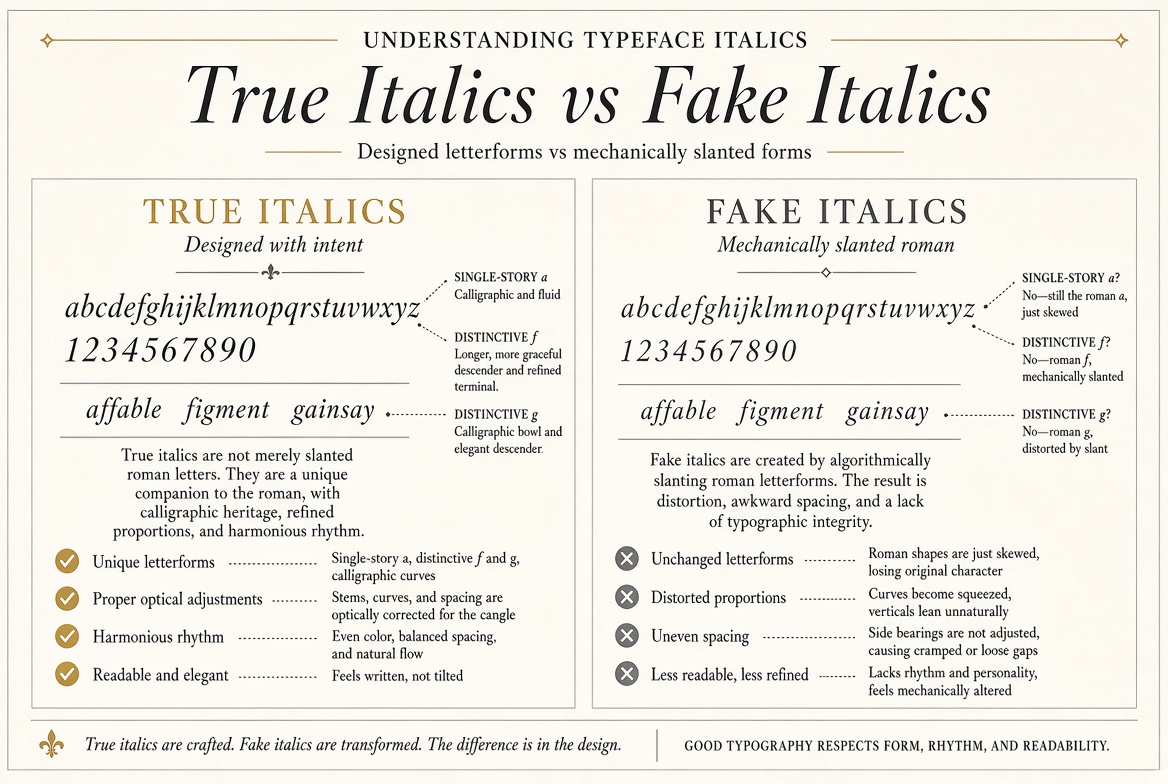
Understanding Typeface Italics: True Italics vs Fake Italics
What Is a True Italic?
A true italic is a completely redrawn version of a typeface, designed from scratch to have a different character — usually more calligraphic, with different letterforms — when slanted. This is not the same as simply tilting the regular weight.
In a true italic, many letterforms are fundamentally different. The lowercase "a" in an italic often changes from a double-story to a single-story version. The "f" develops a curved descender. The "g" changes structure. The "e" changes. The "v" and "w" often develop more cursive forms. These aren't the same letters slightly leaned — they're alternate letterforms designed specifically for the italic style, carrying centuries of calligraphic tradition.
What Is a Faux (Fake) Italic?
When you click "italic" in a program that doesn't have a true italic font file for your chosen typeface, the software mathematically slants the regular font — usually by about 12 degrees. The result is called a "slanted" or "oblique" style (sometimes "faux italic" or "faux oblique").
The problems are immediately apparent to trained eyes:
- The letterforms don't change — you get slanted versions of the upright characters rather than true italic alternates
- Vertical strokes that should remain optically vertical look tilted
- The slanting distorts the stroke contrast — thick strokes become thinner, thin strokes become thicker on one side
- The result looks mechanical rather than calligraphic
How to Tell If You Have a True Italic
Look at the lowercase "a" when italic is applied. If it changes from double-story to single-story, you have a true italic. If it just leans over, you have faux italic. The "f" is another reliable indicator — in true italics, it often develops a descender below the baseline.
Why Font Files Matter
The italic button only activates a true italic if there's an italic font file installed for that font family. Helvetica Neue Italic is a separate file from Helvetica Neue Regular. If you only have the regular file, your application will synthesize a fake italic.
When downloading fonts for professional use, always download the complete family including italic variants. When downloading from FontPlatform, check the available styles listed on each font's page — a good font family will include Regular, Bold, Italic, and Bold Italic as a minimum.
Oblique: The Legitimate Exception
Some fonts are designed specifically as oblique variants rather than true italics. Futura Oblique, for example, is a legitimate, professionally designed slanted version. The distinction matters: an oblique designed by the type designer is not the same as a faux italic generated by software. Check whether the italic you're using is a designed oblique or a synthesized fake.