
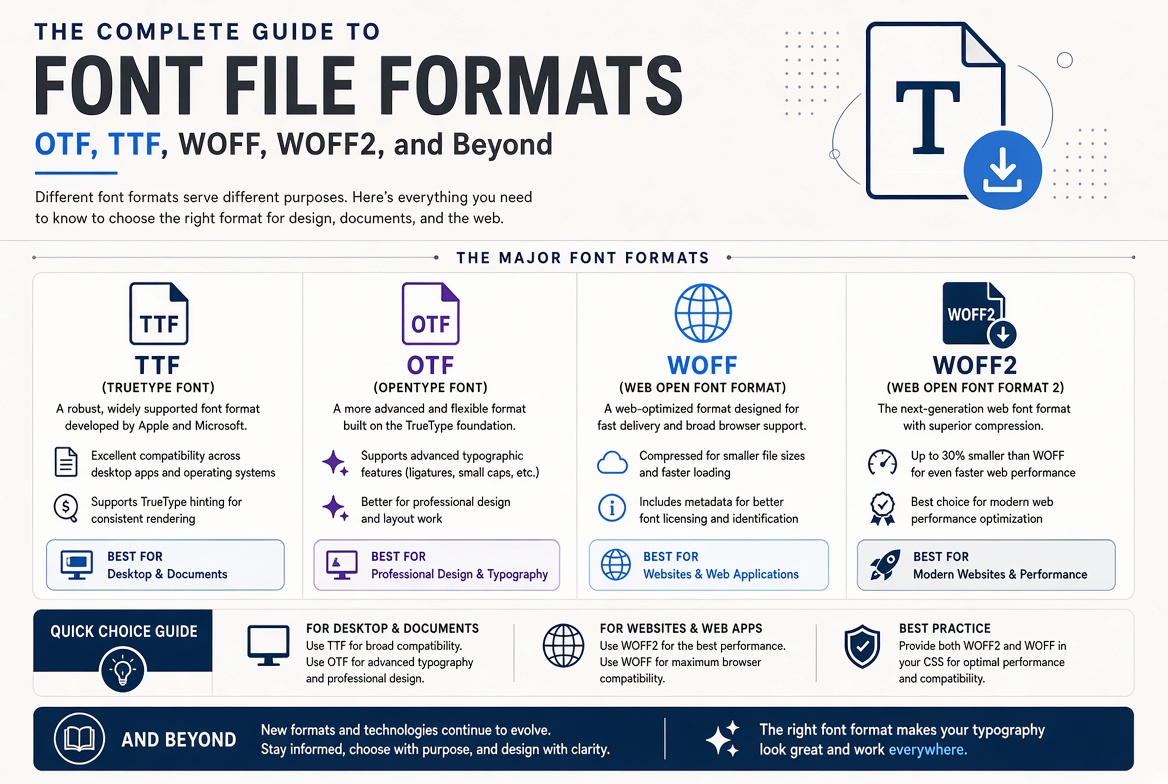
The Complete Guide to Font File Formats: OTF, TTF, WOFF, WOFF2, and Beyond
The Two Foundation Formats: TrueType and OpenType
TrueType (.ttf) was developed jointly by Apple and Microsoft in the late 1980s as a competitor to Adobe's PostScript fonts. TrueType fonts use quadratic Bezier curves to define letter shapes and include a hinting system that gives the font designer precise control over how letters render at small sizes on low-resolution screens. TrueType became the standard font format for both Windows and Mac for nearly two decades.
OpenType (.otf or .ttf) was developed in the late 1990s as a joint effort between Microsoft and Adobe to unify the font format landscape. OpenType is a superset of TrueType — it can contain either TrueType outlines (quadratic curves, saved as .ttf) or PostScript/CFF outlines (cubic Bezier curves, saved as .otf). The .otf extension specifically indicates CFF outlines. OpenType also added support for advanced typographic features: ligatures, stylistic alternates, small caps, old-style figures, contextual swashes, and hundreds of other features that TrueType alone could not express.
For practical purposes: if a font comes in both .otf and .ttf versions, prefer .otf for design work. The CFF outlines in .otf files are generally more compact and precise (cubic curves need fewer control points than quadratic curves to describe the same shape). However, .ttf files sometimes render slightly better at very small sizes on Windows because of superior hinting. For most modern use cases, the difference is negligible.
Web Formats: WOFF and WOFF2
WOFF (Web Open Font Format, .woff) was created specifically for the web. It is essentially a wrapper around an OpenType or TrueType font that adds compression (using zlib) and metadata. A WOFF file is typically 40% smaller than the equivalent raw .otf or .ttf file. WOFF was standardized by the W3C in 2012 and quickly became the standard for web font delivery.
WOFF2 (.woff2) is the successor, using Brotli compression instead of zlib. It achieves roughly 30% better compression than WOFF — meaning WOFF2 files are typically 50-60% smaller than the original .otf/.ttf files. WOFF2 is supported by all modern browsers (Chrome, Firefox, Safari, Edge) and is the format you should be using for web fonts today. There is no technical reason to serve WOFF (version 1) to modern browsers, though including it as a fallback for very old browsers is harmless.
Legacy Formats You Can Forget
EOT (Embedded OpenType, .eot) was Microsoft's proprietary web font format, required for Internet Explorer 8 and earlier. Unless you need to support IE8 (you almost certainly do not), you can ignore EOT entirely. SVG fonts (.svg) were briefly used for early iOS Safari, which did not support other web font formats. Modern iOS has supported WOFF/WOFF2 for years; SVG fonts are obsolete. If you encounter a @font-face declaration that includes EOT and SVG sources, you are looking at code from circa 2012 — it can be safely modernised to WOFF2 with a WOFF fallback.
Variable Font Formats
Variable fonts use the same file extensions (.ttf, .otf, .woff, .woff2) but contain additional tables that define variation axes (weight, width, slant, optical size, and custom axes). A single variable font file can replace an entire family of static fonts. For web delivery, a variable font in WOFF2 format is almost always smaller than serving even three or four static WOFF2 weights of the same family. The format is fully supported in all modern browsers and major design applications.
Which Format for Which Purpose
Here is a practical decision tree. For the web: serve WOFF2 as your primary format, with WOFF as a fallback if you want to cover edge cases. Nothing else is needed. For desktop design work (Photoshop, Illustrator, InDesign, Figma): install the .otf version if available, otherwise .ttf. Both work in all modern design software. For mobile app development: .otf or .ttf, depending on the platform's recommendations (iOS prefers .otf; Android accepts both). For embedding in PDFs: .otf or .ttf — the PDF format embeds a subset of the font directly, so the original format matters less than the licensing terms that permit embedding.
The font format landscape has actually simplified dramatically in the past five years. If you remember two things — WOFF2 for web, OTF for everything else — you will be correct in 95% of situations.